
All integrations
ChatGPT
Connect ChatGPT to Triangle MCP on the web or desktop app. Register Triangle as a custom app in ChatGPT settings, authorize through your Triangle account, and use health tools in chat.
Official ChatGPT documentationBefore you start
- A Triangle account with an active patient profile.
- ChatGPT on the web (chatgpt.com) or a ChatGPT desktop app.
- A paid ChatGPT plan: Plus, Pro, Business, Enterprise, or Edu.
- No Triangle developer portal app is needed — ChatGPT registers itself with Triangle automatically via OAuth.
Connection fields
| Field | Value |
|---|---|
| MCP server URL | https://app.trianglehealth.com/mcp |
| Authentication | OAuth |
| Client ID | Not required — ChatGPT handles OAuth registration automatically |
| Scopes | Not configured in ChatGPT — permissions are granted on Triangle’s OAuth consent screen when you authorize. |
Setup steps
01.Set up the app in ChatGPT
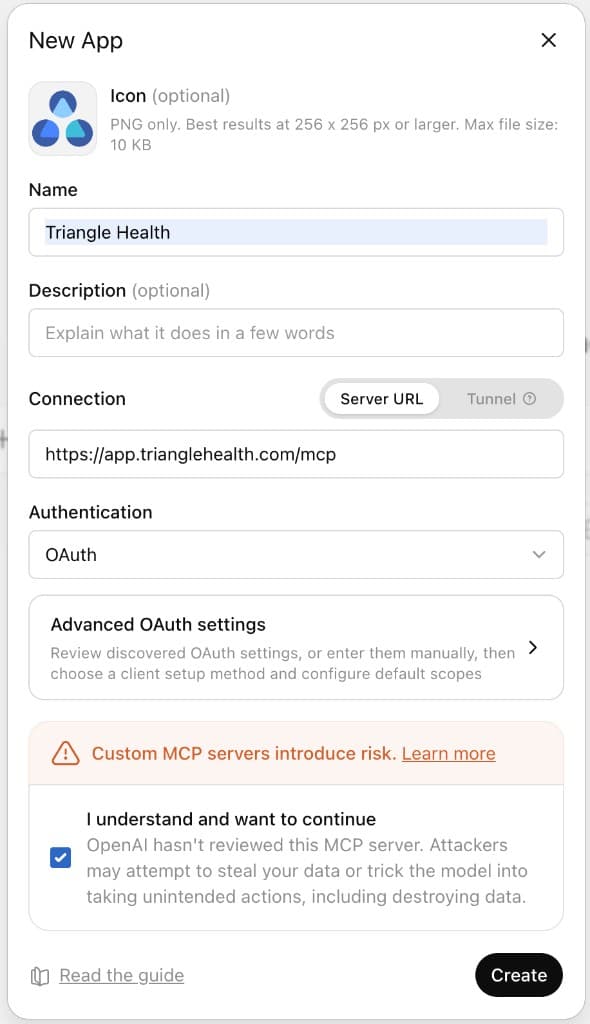
Register Triangle as a custom MCP app in ChatGPT. You only need the MCP server URL — no Client ID or Triangle developer portal setup.
- Open ChatGPT Settings → Apps.
- Under Advanced settings, click Create app.
- Name the app (for example, Triangle Health), set Connection to Server URL, and enter https://app.trianglehealth.com/mcp.
- Set Authentication to OAuth, acknowledge the MCP risk notice, and click Create.
02.Connect the app
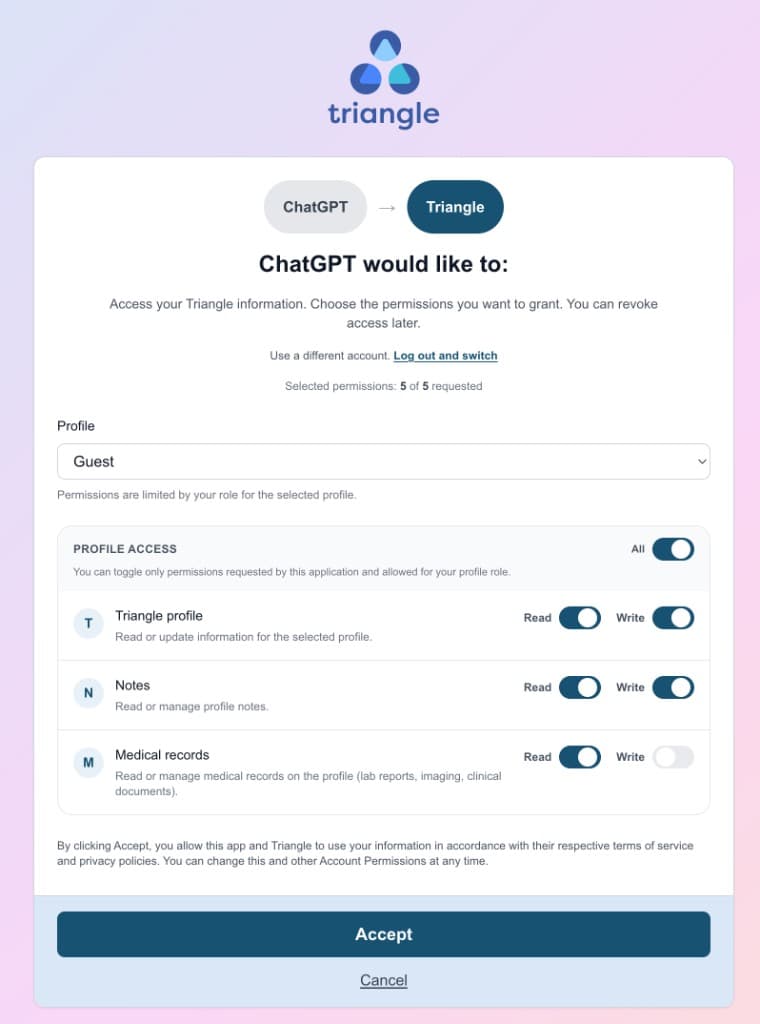
After creating the app, ChatGPT walks you through signing in to Triangle and approving permissions.
- Click Sign in with Triangle Health when the connection dialog appears.
- Sign in to Triangle if prompted, then review permissions on the consent screen and click Accept.
- When finished, ChatGPT shows Triangle Health as connected in Settings → Apps with OAuth authorization.
03.Talk to ChatGPT with Triangle Health
Close the settings dialog and select Triangle Health in a chat to ask questions about your health data.
- Start a new chat or open an existing conversation.
- Select Triangle Health from the apps list in the message composer (or reference it in your prompt).
- Ask ChatGPT to list your health topics, read notes, or summarize medical records in natural language.
- Manage or revoke the connection anytime from Settings → AI Services in the Triangle app.

What you can do after connecting
- Browse and organize health topics on your Triangle profile.
- Read, create, and search notes attached to topics.
- List medical records and read summaries or extracted content (requires medical_records:read consent).
- Inline widgets for topics and notes when you ask ChatGPT to show or display them.
- OAuth handled end-to-end by ChatGPT — no manual Client ID or developer portal registration.
- Works on ChatGPT web and desktop apps.