 Triangle
Claude Science
Use Claude Science on your machine with Triangle MCP tools for topics, notes, and medical records — with OAuth authorization through your Triangle account.
Before you start
- A Triangle account with an active patient profile.
- Claude Science installed locally on your machine.
- An OAuth app you create in the Triangle developer portal (public PKCE client — Client ID only, no secret).
Connection details
What to enter if Claude Science asks for them.
- MCP URL
- https://app.trianglehealth.com/mcp
- OAuth Server URL
- https://app.trianglehealth.com
- Client ID
- Copy from your app detail page in the developer portal after you create the OAuth app
- Scopes
- Optional in the connector — leave blank. Permissions are granted on Triangle’s OAuth consent screen when you authorize.
Set it up
Create and configure your OAuth app
Register a public or confidential OAuth client in the Triangle developer portal. Confidential clients issue a one-time Client Secret for Claude web and future Connect with Triangle API apps.
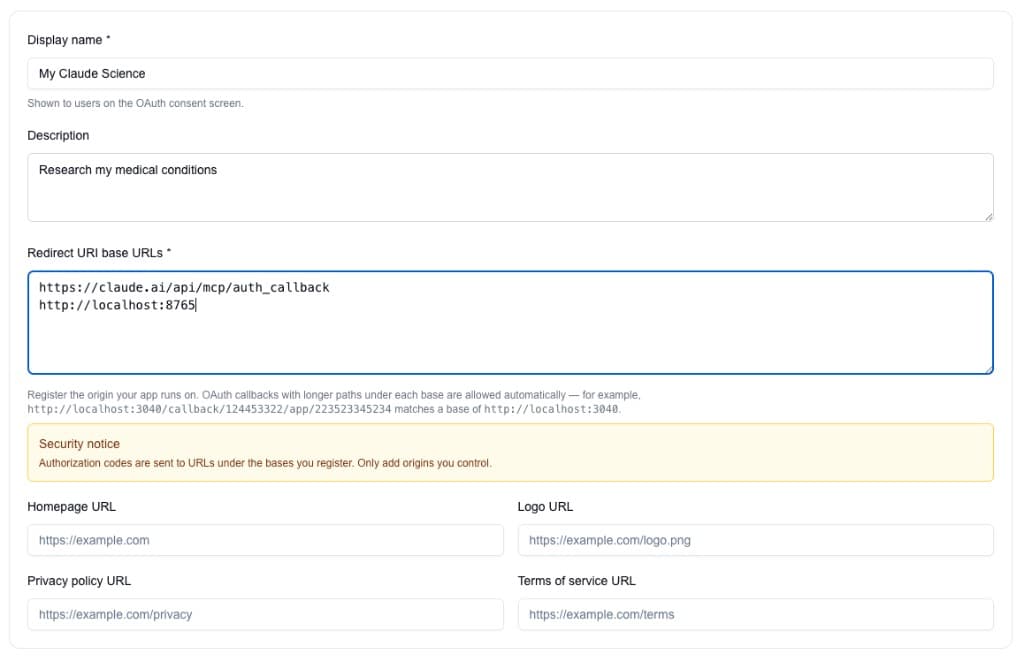
- Open https://app.trianglehealth.com/developer/apps, click Create app, and enter a display name (for example, Claude Science).
- Add redirect URI bases: https://claude.ai/api/mcp/auth_callback and an http loopback base for your machine (for example http://localhost:8765).
- Save the app and copy the Client ID from the app detail page — you will paste it into Claude Science.
- If authorization fails with a redirect URI mismatch, add http://localhost:PORT for the port Claude Science uses.
Create and configure your OAuth app Add Triangle in Claude Science
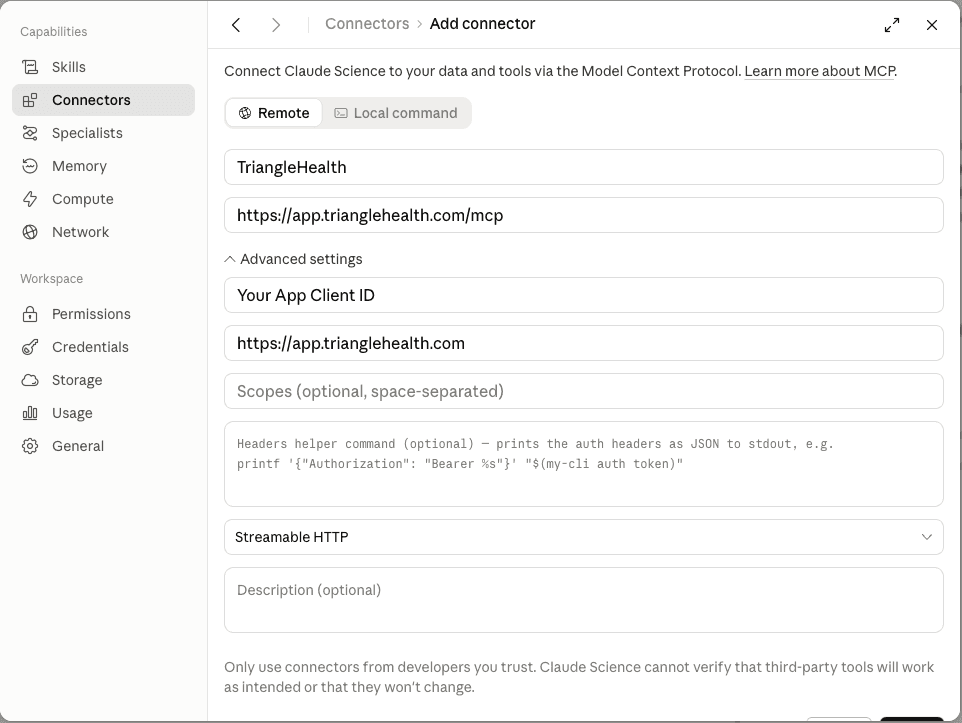
Add a remote MCP connector in Claude Science and paste the Client ID from your Triangle app.
- Open Claude Science → Connectors → Add connector (Remote tab).
- Copy the Client ID from your app’s detail page in the Triangle developer portal.
- Enter the MCP endpoint URL, OAuth server URL, and Client ID in the connector form, then save.
Add Triangle in Claude Science Authorize Triangle on first use
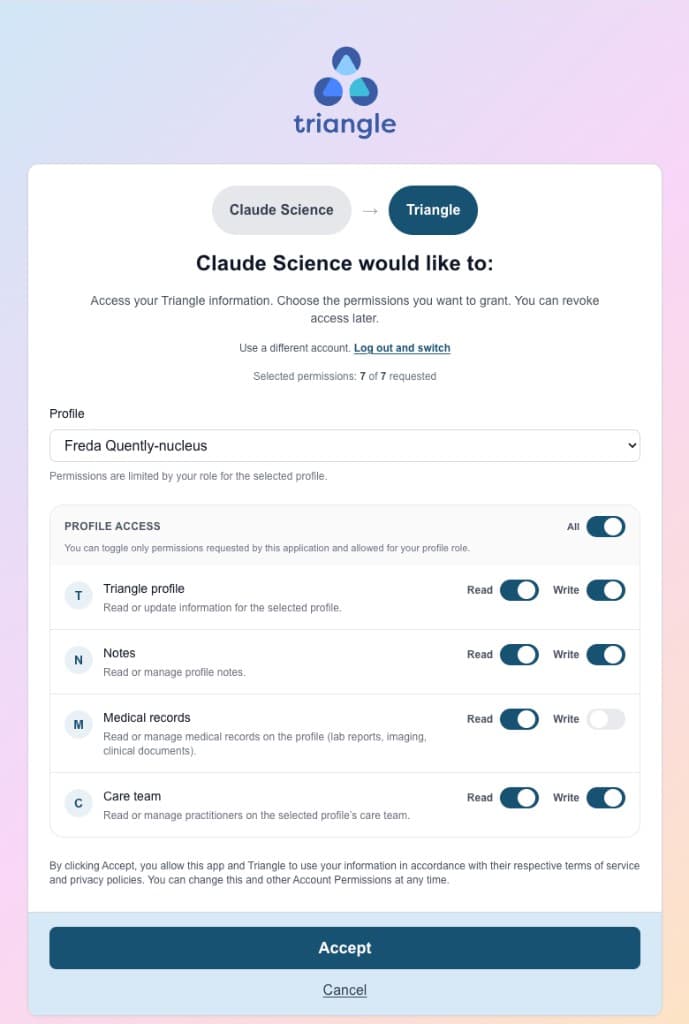
When Claude Science first calls a protected tool, your browser opens to sign in and approve permissions.
- Ask Claude Science to use a Triangle capability (for example, list your health topics).
- Sign in to Triangle when prompted and click Accept on the consent screen.
- New users complete the short setup flow (name, agreements, patient profile) before consent.
Authorize Triangle on first use
What you can do
- Browse and organize health topics on your Triangle profile.
- Read and create notes attached to topics.
- Search notes across topics.
- List medical records and read summaries or extracted content (requires medical_records:read consent).
- Reuse the same developer portal OAuth app if you also use other PKCE-based MCP clients.
- Manage connections anytime from Settings → AI Services in the Triangle app.
Troubleshooting
Authorization fails or loops
Confirm https://claude.ai/api/mcp/auth_callback is registered as a redirect URI base and that you added a loopback base matching the localhost port Claude Science uses. Try disconnecting and reconnecting in Claude Science, or edit your app in the developer portal to add the missing port.
redirect_uri mismatch error
The callback URL must fall under a registered base (same protocol and port). Add http://localhost:PORT for the port shown in the error. Paths under that base are allowed automatically.
Medical record tools return an auth error
Medical records require the medical_records:read scope. Disconnect and reconnect to grant updated permissions at consent.
How do I revoke access?
Go to Settings → AI Services in the Triangle app and click Disconnect next to the Claude connection. Access is revoked immediately.