 Triangle
ChatGPT
Connect ChatGPT to Triangle MCP on the web. Add Triangle as a custom MCP server in ChatGPT Plugins, authorize through your Triangle account, and use health tools in chat.
Before you start
- A Triangle account with an active patient profile.
- ChatGPT on the web (chatgpt.com).
- A ChatGPT Business, Enterprise or Edu plan, where a workspace admin or owner adds Triangle and it can read and make changes; or Pro, where it can read but not make changes. Other plans can’t add custom MCP servers.
- No Triangle developer portal app is needed — ChatGPT registers itself with Triangle automatically via OAuth.
Connection details
What to enter if ChatGPT asks for them.
- MCP server URL
- https://app.trianglehealth.com/mcp
- Authentication
- OAuth
- Client ID
- Not required — ChatGPT handles OAuth registration automatically
- Scopes
- Not configured in ChatGPT — permissions are granted on Triangle’s OAuth consent screen when you authorize.
Set it up
Add Triangle in ChatGPT
Add Triangle as a custom MCP server in ChatGPT Plugins. You only need the MCP server URL — no Developer Mode, Client ID or Triangle developer portal setup.
- Open Plugins, select the + button, then Add custom MCP server.
- Name it (for example, Triangle Health) and, under Connection, enter https://app.trianglehealth.com/mcp.
- Set Authentication to OAuth.
- Tick I understand and want to continue, then select Create as a plugin.
- The older route, Settings → Apps → Create, still works; OpenAI now calls it legacy.
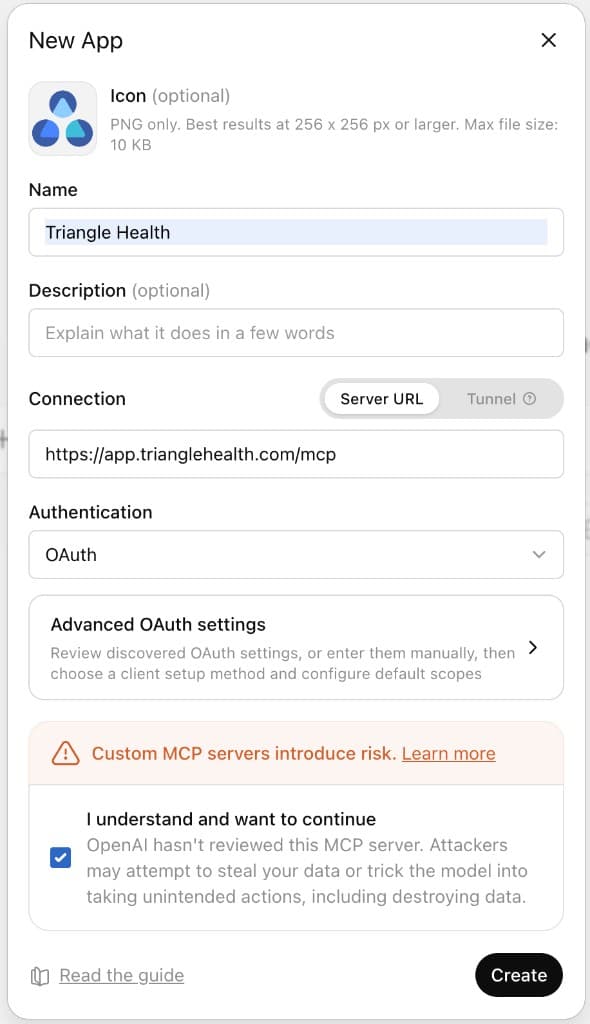
Add Triangle in ChatGPT Connect the app
While the plugin is created, ChatGPT walks you through signing in to Triangle and approving permissions.
- Click Sign in with Triangle Health when the connection dialog appears.
- Sign in to Triangle if prompted, then review permissions on the consent screen and click Accept.
- ChatGPT then lists the Triangle tools it found. Install the plugin to use it in chats.
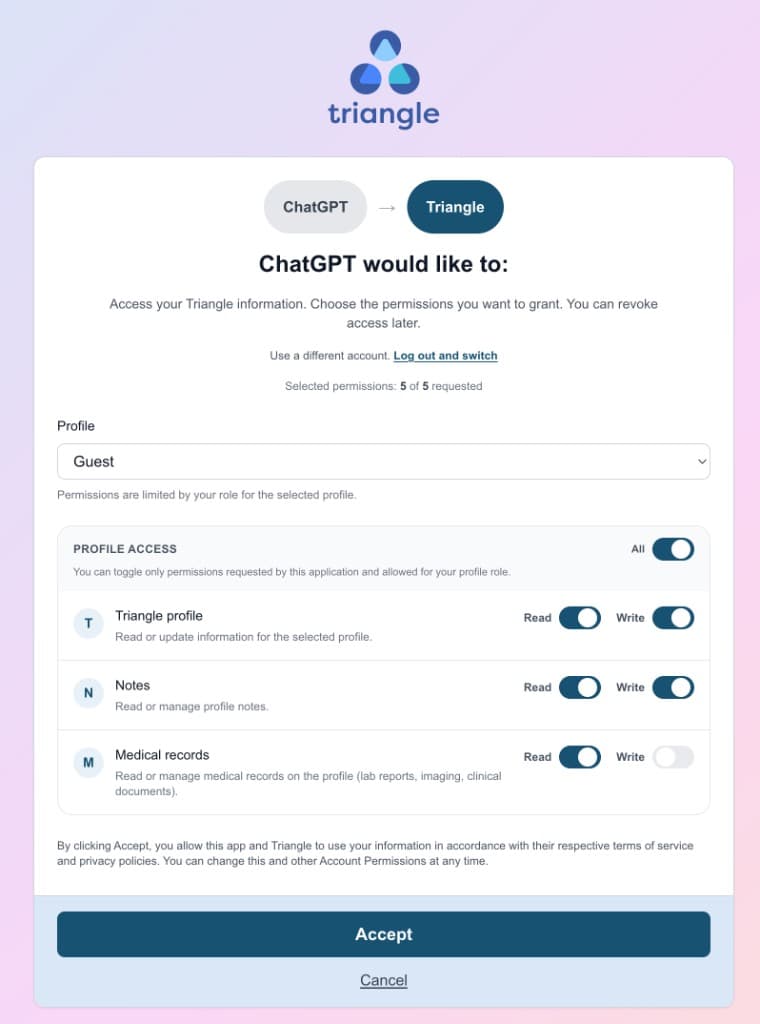
Connect the app Talk to ChatGPT with Triangle Health
Close the settings dialog and select Triangle Health in a chat to ask questions about your health data.
- Start a new chat or open an existing conversation.
- Type @ in the message box and select Triangle Health.
- Ask ChatGPT to list your health topics, read notes, or summarize medical records in natural language.
- Manage or revoke the connection anytime from Settings → AI Services in the Triangle app.

Talk to ChatGPT with Triangle Health
What you can do
- Browse and organize health topics on your Triangle profile.
- Read, create, and search notes attached to topics.
- List medical records and read summaries or extracted content (requires medical_records:read consent).
- Inline widgets for topics and notes when you ask ChatGPT to show or display them.
- OAuth handled end-to-end by ChatGPT — no manual Client ID or developer portal registration.
- Works on ChatGPT web and desktop apps.
Troubleshooting
I do not see Add custom MCP server
Custom MCP servers need a ChatGPT Business, Enterprise or Edu plan (added by a workspace admin or owner) or Pro (read-only). Check your plan and OpenAI’s help article for the latest availability.
ChatGPT never prompts me to link Triangle
Finish Add custom MCP server and click Sign in with Triangle Health when prompted. Confirm the MCP server URL is exactly https://app.trianglehealth.com/mcp.
Medical record tools return an auth error
Medical records require consent for medical records access. Disconnect Triangle Health in ChatGPT Settings → Apps and reconnect, or revoke access in Triangle Settings → AI Services and authorize again.
Do I need the Triangle developer portal for ChatGPT?
No. ChatGPT uses dynamic client registration with Triangle automatically. Claude web and Grok work the same way. The developer portal is for clients that need explicit credentials — for example Claude Science, Perplexity, and LM Studio — see the developer portal guide on this site.
How do I revoke access?
Go to Settings → AI Services at https://app.trianglehealth.com and click Disconnect next to the ChatGPT connection. You can also disconnect from ChatGPT Settings → Apps.